What Is SDMS? A Complete Guide to Scientific Data Management Systems
 Request a Demo
 Download Brochure
What Is SDMS? A Complete Guide to Scientific Data Management Systems
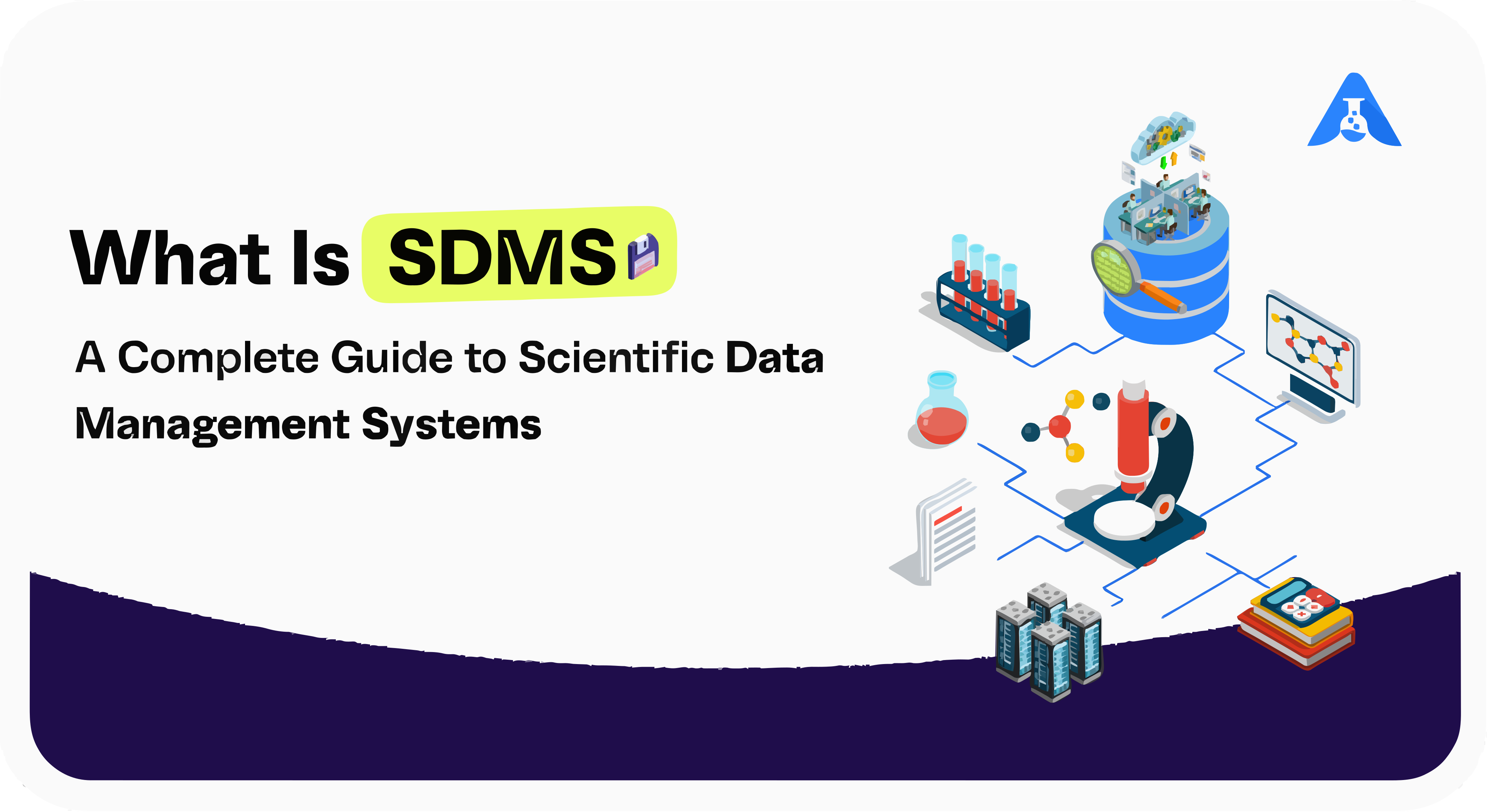
Is your laboratory data scattered across instrument PCs, shared folders, USB drives, and different systems? With chromatography files, spectrometer data, instrument readings, images, and reports being generated every day, finding the right record, tracking changes, and maintaining data integrity can quickly become difficult. A Scientific Data Management System (SDMS) brings this data together in a secure, organized environment, making it easier to capture, index, store, retrieve, and protect scientific records while supporting audit and compliance requirements.
This guide explains what an SDMS is, how scientific data management works, what to look for when evaluating SDMS software, and how it can simplify laboratory data management across different industries.
What is SDMS software?
A Scientific Data Management System (SDMS) software is a centralized software platform specifically designed to capture, store, organize, and manage instrument-generated data produced by laboratory equipment. This includes raw instrument files, measurement outputs, images, and associated metadata generated by laboratory instruments. SDMS automates the capture of this instrument-generated data directly from connected laboratory equipment, eliminating the need for manual file transfers and reducing reliance on local storage. It ensures that instrument data is automatically captured, securely stored, and preserved in its original format for future access and traceability.
SDMS software like Logilab SDMS does more than store data. It adds context through metadata and tags, maintains file versions, tracks user activity, and makes data easier to search and retrieve. This helps laboratories create a reliable source of truth for scientific data management, improve data traceability, and support efficient laboratory instrument data management across teams and locations.
How SDMS software works?
Imagine an analyst finishing a chromatography run. The raw data, CSV files, images, and reports are sitting across the instrument PC, and the team needs to make sure every file is captured and safely stored. This is where SDMS software comes in. It automatically captures data from PC-based instruments, including raw files, CSV and TXT files, images, and Excel sheets. It can also generate human-readable PDF copies through a virtual PDF printer, keeping results accessible even if the original instrument software is retired.
Standalone instruments can also connect to Logilab SDMS through RS232, TCP/IP, and analog signals such as 4–20 mA and 0–50 V using hardware converters. Agaram Technologies’ Interfacer middleware connects IVD analyzers for uni-directional and bi-directional data exchange. For chromatography data systems, SDKs and REST APIs can capture complete project, sequence, and run data.
Once captured, files are transferred via SFTP or FTP to the central server, where Logilab SDMS preserves the instrument PC’s original folder structure. Analysts can then browse and retrieve files in a familiar way, making scientific data easier to manage, trace, and access.
Key SDMS Capabilities and Modules
A. Universal Instrument Connectivity
Instead of managing data separately across multiple instrument systems, SDMS connects analytical, physical, and clinical instruments in one environment, regardless of make, model, or file format.
- PC-Based Instruments: When data is generated on an instrument PC, Logilab SDMS automatically captures proprietary raw files, CSV, TXT, images, and Excel files. A virtual PDF printer can also create human-readable copies of results.
- Standalone Instruments: When an instrument does not have a PC, Logilab SDMS can connect through RS232, TCP/IP, and analog ports using hardware converters and A/D adapters.
- Clinical Diagnostics: For clinical laboratories, Interfacer Middleware serves as the dedicated diagnostic connectivity engine within Logilab SDMS, connecting IVD analyzers via uni-directional and bi-directional data exchange to automatically capture, catalogue, and archive raw clinical results into an audit-ready central repository.
- Chromatography Data Systems: For chromatography workflows, SDKs and REST APIs connect with CDS platforms to capture complete project, sequence, and run data.
B. DMS Explorer and File Lifecycle Management
Once data is captured, SDMS organizes it in a centralized repository while maintaining the structure and context users are familiar with.
- Original Folder Structure: Data is transferred through SFTP/FTP while replicating the instrument PC’s original folder structure, making files easy to navigate and retrieve.
- Multi-Format Viewer: Analysts can view TXT, PDF, CSV, and TIFF files directly in a browser without opening the original instrument software.
- Version Control and Recovery: File versions are tracked automatically, with options to roll back, download, or restore previous versions when required.
- Configurable Workflows: Teams can configure electronic signature workflows for review, approval, and document release.
C. Intelligent Metadata and Data Parsing
Logilab SDMS adds context to captured files through metadata and extracts useful information from reports and instrument outputs.
- Metadata Tagging: Teams can apply pre- or post-capture metadata using hierarchies such as Project → Sample Type → Sample ID → Test Method → Batch.
- Web-Based Parser: The parser extracts structured values from TXT, CSV, and PDF reports, including chromatogram peak tables and result data.
- REST API Access: Parsed data can be shared with external databases and applications through REST APIs, supporting integration and further analysis.
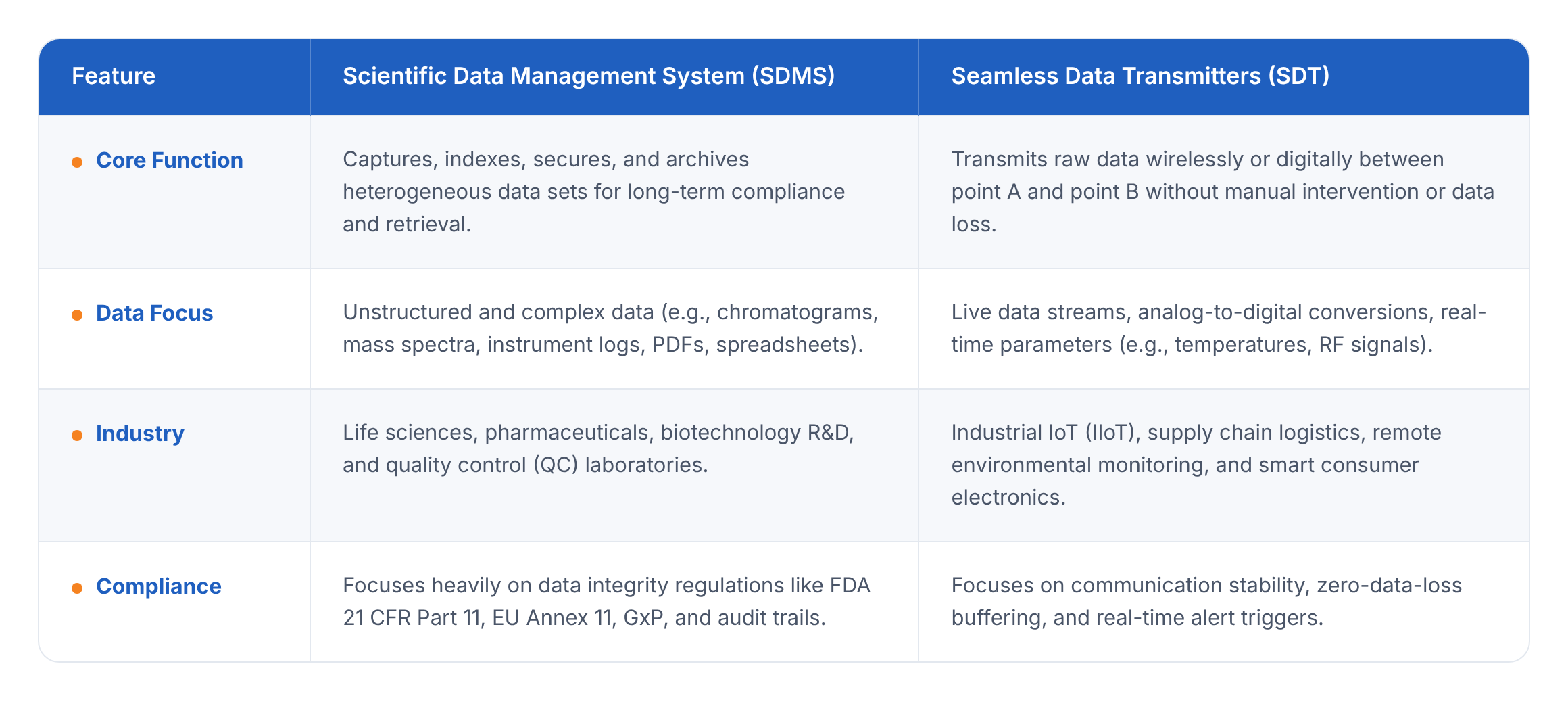
SDMS vs Seamless Data Transmitters
SDMS Data Integrity and Compliance
For regulated laboratories, maintaining trustworthy electronic records is essential. ALCOA+ provides a widely used framework for data integrity, while regulations such as FDA 21 CFR Part 11, EU Annex 11, cGMP, and GLP define requirements for electronic records and systems. Logilab SDMS supports these requirements, helping laboratories maintain secure, traceable, and audit-ready scientific data.
Logilab SDMS supports key ALCOA+ principles through built-in controls. Records are attributable through role-based access control and Windows Active Directory single sign-on, linking actions to individual users. They remain legible through human-readable PDF copies of proprietary outputs and contemporaneous through scheduled data capture and time-stamped audit trails. Raw files remain original by being preserved in secure SFTP or cloud storage with their folder structures intact, while automated capture and checksum validation help maintain accurate records and reduce manual transcription errors. For long-term preservation, the platform automates secure, tamper-evident data archival in cloud or SFTP storage, enforcing smart retention rules and full file restoration for disaster resilience and audit readiness.
The audit trail records activities such as uploads, downloads, version restores, manual edits, permission changes, Windows service start and stop events, and communication failures. Additionally, Logilab SDMS’s SaaS-based, multi-tenant architecture enables centralized data management across global sites, supporting consistent data integrity and compliance practices.
Download SDMS brochure to learn more
How SDMS Solves Data Management Challenges Across Industries
Different laboratories face different data challenges, but the underlying problem is often the same: too much scientific data, stored across too many systems, with too much manual handling. An SDMS helps centralize this data, improve traceability, and reduce the risks associated with scattered files and manual processes.
Pharmaceutical and Biopharmaceutical Labs: QC teams often manage data from chromatography systems, UV-Vis instruments, balances, and titrators across multiple workstations. Manual file collection and transcription can make it difficult to trace a reported result back to its original data. Logilab SDMS automatically captures and stores these records, providing a central, audit-ready source that can integrate with systems such as LIMS and ELN.
Life Sciences, Cell & Gene Therapy, and Drug Discovery: Research teams generate large volumes of images, screening data, and experimental files that need to remain accessible for years. Scattered storage can make valuable research data difficult to locate and protect. SDMS provides centralized storage for these diverse file types, helping teams preserve research data and protect critical scientific assets.
Clinical Research Organizations: CROs managing BA/BE and clinical studies need to keep data from different clients, studies, and protocols clearly separated. Without controlled access, managing multiple projects can become complex. Logilab SDMS uses logical data segregation and role-based permissions to keep project data organized and accessible only to authorized users.
Clinical Diagnostics and Healthcare: Diagnostic laboratories often operate multiple analyzers, making accurate data transfer essential. Agaram Technologies’ Interfacer connects IVD analyzers with laboratory and hospital information systems, supporting uni-directional and bi-directional data exchange. Logilab SDMS captures and securely stores diagnostic results as searchable records with audit trails. This ensures reported results remain linked to original analyzer files, improving traceability and data integrity.
Specialty Chemicals, Food & Beverage, and Petrochemicals: Laboratories in these industries routinely test raw materials, in-process samples, and finished products for quality, composition, purity, safety, and performance. These tests generate data from instruments across different sites, which can make it difficult to keep records organized and accessible. Logilab SDMS brings data from multiple sites into one centralized platform, helping teams standardize how data is captured, stored, and accessed while supporting multilingual operations.
Conclusion
Effective scientific data management is about more than storing instrument files. A Scientific Data Management System (SDMS) software helps laboratories turn scattered instrument output into structured, searchable and traceable data. By preserving original files, maintaining audit trails and connecting data with systems such as LIMS and ELN, an SDMS can support data integrity, compliance and more efficient laboratory workflows. The right solution should also fit existing instruments and infrastructure while providing the flexibility to scale as laboratory needs grow. Logilab SDMS supports these requirements with instrument connectivity, data management, integration capabilities and flexible deployment options.
Stop asking “Where did that file go?” and start asking, “What can we learn from the data?” See it with a personalized SDMS demo built around your lab’s workflows today!
- What Is SDMS? A Complete Guide to Scientific Data Management Systems
- What is SDMS software?
- How SDMS software works?
- Key SDMS Capabilities and Modules
- A. Universal Instrument Connectivity
- B. DMS Explorer and File Lifecycle Management
- C. Intelligent Metadata and Data Parsing
- SDMS vs Seamless Data Transmitters
- SDMS Data Integrity and Compliance
- How SDMS Solves Data Management Challenges Across Industries
- Conclusion