
Streamlining Scientific Excellence: Unveiling the Power of Logilab ELN’s Sheet Templates
 Request a Demo
 Download Brochure
Introduction
In the dynamic landscape of scientific research and laboratory operations, the effective management of experimental and test data is paramount to success. Electronic Laboratory Notebooks (ELNs) have emerged as indispensable tools, revolutionizing how laboratories capture, organize, and utilize data. Among these, Logilab ELN stands out as a comprehensive solution designed to meet the diverse needs of modern research environments. In this blog post, we will explore the pivotal role that sheet templates within Logilab Electronic Lab Notebook play in facilitating efficient data capture, validation, and utilization in a secure, collaborative, and compliant manner for laboratory users.
At the heart of Logilab ELN lies its powerful sheet template feature, which empowers users to create and customize structured frameworks for recording experimental data. This capability not only streamlines the data capture process but also ensures consistency and standardization across experiments and research teams. Through intuitive tools and flexible customization options, researchers can tailor sheet templates to align with their specific experimental protocols and analytical workflows, promoting accuracy and efficiency in data collection.
As we delve into the various dimensions of Logilab Electronic Lab Notebook’s sheet template functionality in this blog post, we will uncover how it addresses the evolving needs of laboratory environments, integrates seamlessly with existing workflows and instruments, and ensures compliance with regulatory standards.
About Logilab ELN
Logilab ELN is Agaram Technologies’ time-tested advanced Electronic Lab Notebook (ELN) application to transform laboratories to record, store and execute quality and research data in digital and paperless manner.
Logilab ELN is designed to fit Quality labs & research organisations involved in projects & product development across both regulated & non-regulated environments. It provides a streamlined & error-free environment for Scientists, Researchers, QC labs & Universities to record & store their data in such a way to fulfill US FDA 21 CFR Part 11 and other regulatory compliance. As regulatory expectations continue to shift toward risk-based validation and stronger authentication for high-risk actions, having audit trails, electronic signatures, and version control built into the notebook itself, rather than layered on afterward, becomes less of a convenience and more of a baseline requirement.
Logilab ELN’s Core Features
Experiment Documentation
Researchers can record experiments, observations, procedures, results, and conclusions in one centralized digital record. Logilab ELN organizes experimental data using structured fields and automatic timestamps, improving data traceability, consistency, and integrity. This makes it easier for teams to search, review, reproduce, and verify experiments while maintaining a reliable record for audits and regulatory requirements.
Labsheet & Protocol Templates
Labsheet and Protocol Templates allow users to create customized templates based on their laboratory protocols for consistent data validation and capture. Since templates are user-designed, they can be adapted to different experiments and updated as protocols evolve, giving laboratories the flexibility to standardize data collection without being restricted by a fixed system structure.
Task Management
Researchers and lab managers can create, assign, and track tasks alongside experimental activities. By keeping tasks, deadlines, and experimental data connected, Logilab ELN helps teams stay organized, monitor progress, and complete laboratory activities without relying on separate task-tracking tools.
Instrument Integration
Logilab ELN can automatically capture data from PC-based and non-PC-based laboratory instruments using advanced parsing capabilities. This reduces manual data entry, minimizes transcription errors, and connects instrument-generated results directly with the relevant experimental records.
LIMS Integration
Logilab ELN integrates with Qualis LIMS to connect samples, tasks, and LIMS orders with experimental activities. This enables information to flow between the ELN and LIMS, reducing duplicate data entry and providing a connected workflow from sample management through experimentation.
Configurable Workflows & Audit Trail
Configurable workflows allow laboratories to define their own review, approval, and sign-off processes based on their operational requirements. The built-in audit trail automatically records user and system activities with timestamps, providing complete traceability and supporting data integrity, accountability, and regulatory compliance.
Dynamic Reporting
Dynamic Reporting enables users to create and generate detailed reports using experimental data stored within the ELN. With configurable reporting capabilities, teams can organize and present data for internal reviews, analysis, documentation, and regulatory or client requirements without relying on separate reporting tools.
About Logilab ELN’s Labsheet’s role
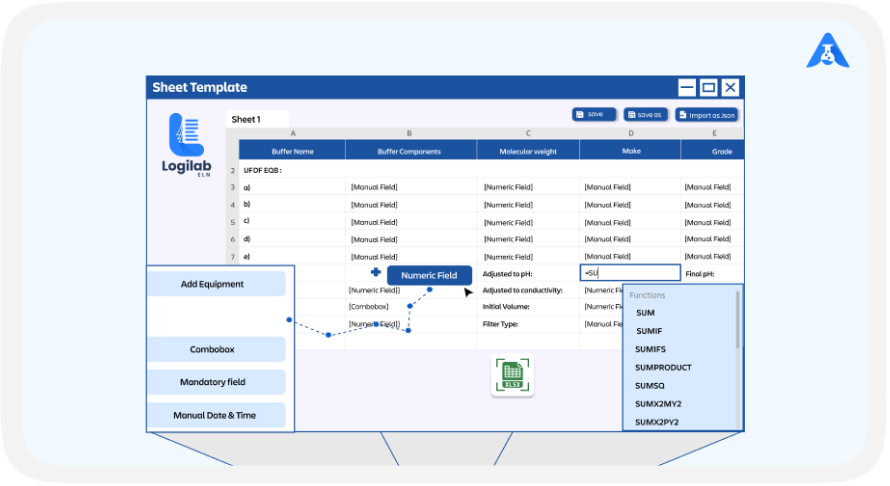
Logilab ELN (Electronic Lab Notebook) offers a robust feature called the Labsheet, designed to enhance the efficiency and accuracy of data capture within laboratory settings. The functionality of the Labsheet feature revolves around the creation and execution of customizable sheet templates, which cater to the specific data recording needs of different laboratory workflows.
Here's a breakdown of how it works and the benefits it brings:
1. Creation and Customization of Sheet Templates
Users can create templates that include a variety of specialized data fields tailored to the needs of their experiments or processes. These fields can include:
- Text fields: For descriptive data, observations, or any textual content.
- Numeric inputs: For quantitative data like measurements or calculations.
- Dropdown lists: To ensure consistent data entry, users can choose from predefined options.
- Date fields: Useful for recording timelines or specific dates related to the experiment.
- Formulas: To automate calculations and derive values based on other input fields within the template.
These data fields make it possible to capture data dynamically and precisely, directly in the spreadsheet interface of the electronic lab notebook.
2. User Interface and Interaction
The design of the Labsheet feature incorporates a user-friendly drag-and-drop interface. This approach offers several advantages:
- Ease of Use: Users can easily add, rearrange, and configure data fields within the template by simply dragging and dropping elements into place.
- No Coding Required: The interface is designed to be intuitive, eliminating the need for programming skills or extensive training. This makes it accessible to users of all technical levels.
- Flexibility: The drag-and-drop mechanism (selecting specific fields and placing them where required) allows for quick adjustments and modifications to the template, which is beneficial in a dynamic lab environment where requirements may change frequently.
3. Adaptability to Laboratory Needs
The Labsheet feature is highly adaptable, supporting everything from simple data entry to complex experiments with calculations, helping reduce manual errors and improve efficiency. As laboratories grow, templates can be easily updated or reused for new instruments, research projects, or teams. With Logilab ELN's cloud deployment, researchers across multiple sites can securely access the same live templates and data through a web browser, making collaboration and scaling seamless without requiring additional on-site infrastructure.
4. Integration and Automation
Beyond just data capture, the Labsheet templates can be integrated with other features of the Electronic Lab Notebook, such as linking data entries to specific projects (assignment of project team users to the specific project is possible), automating data analysis, and generating reports. This integration helps in maintaining data integrity and facilitates easier data management and retrieval.
Overall, the Labsheet feature in Logilab ELN, represents a significant step forward in electronic lab notebook technology, offering laboratories a powerful tool to streamline their data capture processes while ensuring data accuracy and compliance with regulatory standards. The user-friendly interface and customizable nature of the Labsheet make it an essential tool for modern laboratories aiming to enhance productivity and data management.
5. Version and Release control
The version and release control capability of Logilab Electronic Lab Notebook’s Labsheets is a crucial aspect that plays a significant role in ensuring data integrity and compliance, particularly in environments where meeting audit and quality standards such as 21 CFR Part 11 is required. Let us have a detailed look at how this feature works and the benefits it provides:
- Tracking Changes: Logilab ELN’s Labsheets are equipped with robust version control systems that automatically track every change made to the data or the sheet template itself. This includes modifications to data entries, structural changes to the sheet layout, and adjustments in formulas or data field types.
- Audit Trails: Each modification is logged with detailed metadata, including the timestamp of the change, the identity of the user who made the change, and a description of what was changed. This creates a comprehensive audit trail that is essential for reviewing the history of the data, understanding the context of changes, and reverting to previous versions if necessary.
- Viewing of previous versions: The system allows users to view any previous version of the Labsheet and compare them with the existing version. This feature is particularly useful in case of errors or when data needs to be reviewed in its earlier form for comparison or regulatory purposes.
6. Labsheet Approval Workflow
- Approval of labsheets: Once a Labsheet template is finalized, it can be routed for review and approval. This prevents unauthorized or accidental modifications which could compromise data integrity.
- Controlled Edit Permissions: The release control mechanism also involves setting permissions for those who can edit the Labsheet. This ensures that only authorized personnel can make changes to the template or the data, adhering to internal controls and compliance requirements.
- Compliance with 21 CFR Part 11: The version and approval process in Logilab Electronic Lab Notebook are designed to comply with regulations like 21 CFR Part 11, which pertains to the electronic records and electronic signatures in the pharmaceutical, clinical research, and other FDA-regulated industries. The system supports:
- Electronic Signatures: Ensuring that each entry and modification is not only logged but also electronically signed by the responsible individual.
- Secure Access: Implementing secure login mechanisms, password protections, and user authentication to prevent unauthorized access to sensitive data.
Integration Capabilities
Logilab ELN can connect to laboratory file-based instruments, allowing for the automatic transfer of data into Labsheets. This typically works through API connectivity, which creates a seamless data flow from instruments into the notebook, paired with data parsing and formatting tools that ensure the incoming data matches the structured format of the Labsheet correctly.
The following are the ways in which these capabilities are implemented and their impact:
Automated Metadata Capture
- Seamless Metadata Integration: Logilab ELN’s Labsheets can be configured to automatically capture essential metadata associated with experiments. This includes sample names, project identifiers, user details, timestamps, and other contextual data. Automation in capturing this metadata ensures that all relevant information is consistently and accurately logged without requiring manual input.
- Predefined Templates: Labsheets can be pre-configured with fields specifically designed to pull in metadata from other parts of the Electronic Lab Notebook or directly from integrated systems like Qualis LIMS. When a new experiment or test is started or a sample is logged, associated metadata fields within the Labsheet are automatically populated based on predefined rules or identifiers.
Direct Data Integration from Laboratory Instruments
- Direct Instrument Integration: Logilab ELN can connect to laboratory file-based instruments allowing for the automatic transfer of data into Labsheets. This integration typically involves:
- API Connectivity: Using application programming interfaces (APIs) to create a seamless data flow from instruments to the Electronic Lab Notebook.
- Data Parsing and Formatting Tools: To ensure compatibility and correct formatting of the data from various instruments into the structured format of the Labsheet.
- Real-Time Data Entry: As data is generated by instruments, it can be directly input into the corresponding fields in the Labsheet in real-time. This minimizes delays, reduces the risk of transcription errors, and ensures that data is immediately available for analysis.
Conclusion
The Logilab Electronic Lab Notebook (ELN) Labsheet Template feature simplifies laboratory data management by providing standardized templates for accurate data capture, validation, and analysis. Its intuitive interface helps researchers improve productivity, reduce manual errors, and maintain consistency across experiments while supporting laboratory compliance and data integrity.
With built-in automation, version control, audit trails, and approval workflows, Logilab ELN enables secure collaboration and seamless integration with laboratory instruments and systems. Whether supporting small research teams or large multi-site organizations, Logilab ELN helps laboratories streamline workflows, meet regulatory requirements, and accelerate scientific research through efficient digital laboratory management.
For labs weighing whether their current notebook setup can keep pace with where compliance expectations are heading, the fastest way to know is to see how Labsheets, audit trails, and approval workflows handle a real experimental protocol. Want to see Labsheets in action? Request a personalized ELN demo today!
- Introduction
- About Logilab ELN
- Logilab ELN’s Core Features
- About Logilab ELN’s Labsheet’s role
- Integration Capabilities
- Conclusion

Related articles

Logilab ELN vs. Logilab ELN Lite: Finding the Right Fit for Your Lab
In today’s rapidly evolving research environment, managing and securing experimental data is more critical...

How LIMS Software Helps Achieve FDA 21 CFR Part 11 Compliance
In the intricate landscape of laboratory operations, adherence to stringent regulatory standards is crucial...

How SDMS Centralizes Scientific Data Across Laboratories
Introduction Managing and securing research data effectively is more crucial than ever in today’s data-inte...
 Contact Us