What is LIMS Software? Benefits, Features & Why Modern Labs Need It
 Request a Demo
 Download Brochure
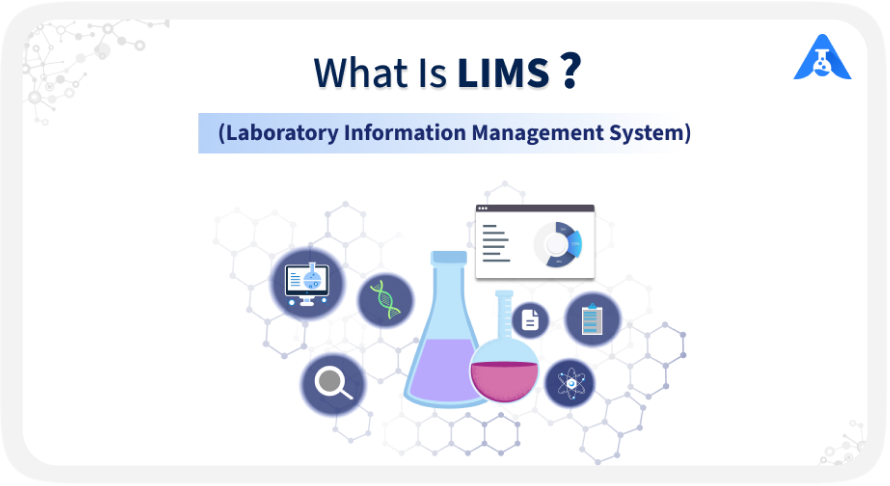
Understanding Laboratory Information Management Systems (LIMS) doesn’t have to be complicated. Whether you’re a lab technician, scientist, or project manager, you don’t need a software engineering background to benefit from LIMS. Yet, technical complexity can often make adopting new lab technology seem challenging.
With user-friendly LIMS platforms and the right guidance, laboratories can simplify processes, improve accuracy, and work more efficiently. This guide breaks down LIMS in simple terms to help you understand how it can support modern laboratory operations.
What is a Laboratory Information Management System (LIMS)
A Laboratory Information Management System (LIMS) is a software system designed to streamline the management of laboratory data and operations. You can utilise it in various scientific and industrial settings, tackling the large volumes of data that have to be dealt with in pharmaceuticals, healthcare, environmental science, manufacturing and research institutions.
Key Features of Qualis LIMS
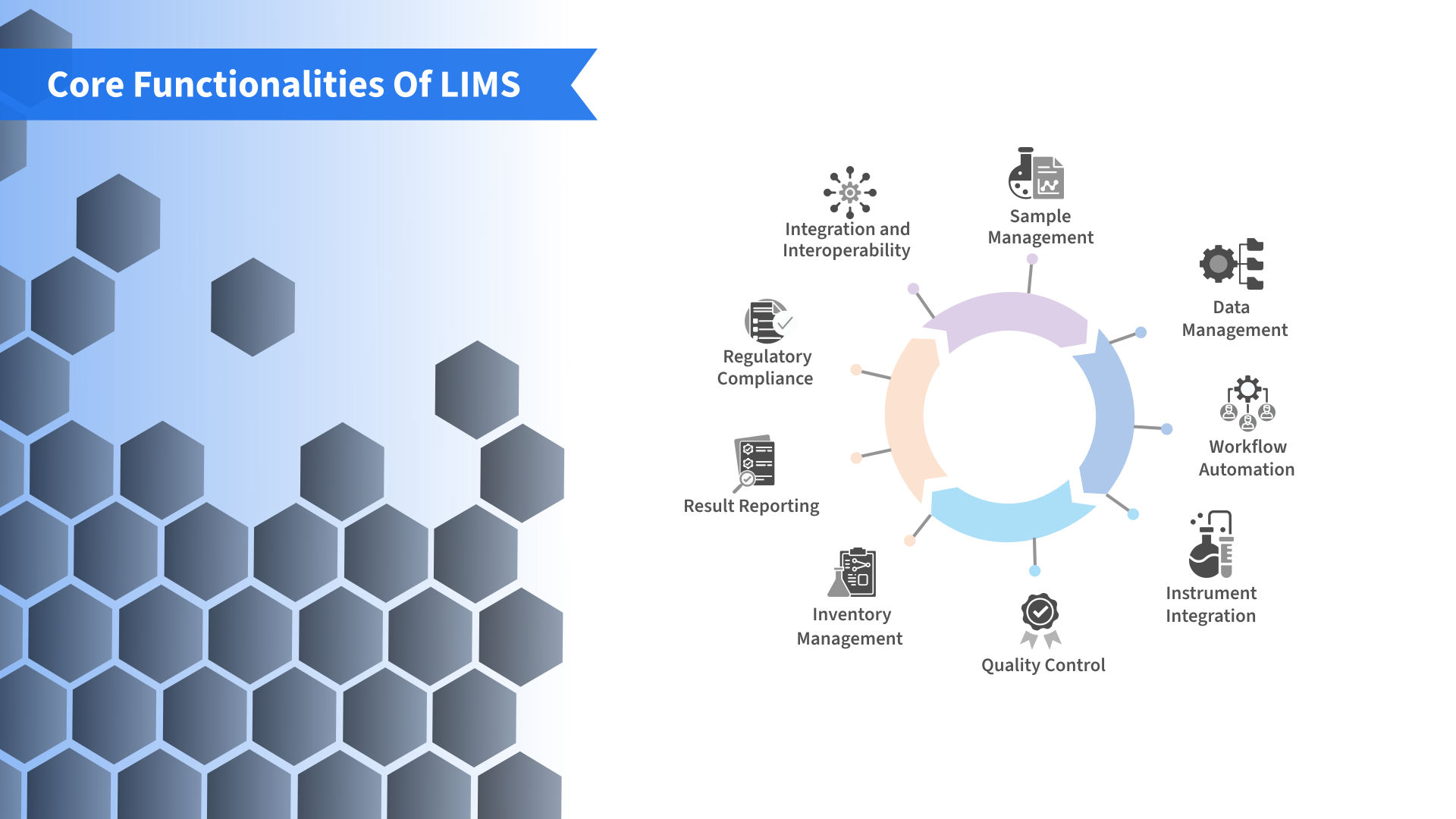
Qualis LIMS provides a comprehensive platform for managing samples, testing, laboratory workflows, compliance, reporting, and enterprise integrations across modern laboratories.
Sample Lifecycle and Specimen Management
Flexible Sample Registration: Create customized registration templates with configurable metadata fields for different sample types.
Sub-Sample and Aliquot Management: Create, allocate, and independently track multiple sub-samples and aliquots.
Bulk Sample Ingestion: Import large sample datasets while managing aliquoting sequences and storage locations.
Barcode Label Generation: Generate and print barcode labels during sample intake for accurate identification and traceability.
Multi-Type Sample Management: Manage raw materials, environmental samples, in-process materials, finished products, research samples, and clinical or patient samples.
Testing and Specification Management
Test Grouping: Organize tests by assays, laboratory disciplines, or testing categories.
Dynamic Specifications: Configure parameter limits, component ranges, and acceptance criteria based on methods and SOPs.
Conditional Test Assignment: Use logical rules to automatically assign tests based on sample types, departments, or other conditions.
Result-Based Actions: Trigger alerts, comments, or follow-up tests when results fall outside defined specifications.
Work Allocation and Competency Management
Automated Work Assignment: Assign pending tests to qualified and available laboratory personnel.
Training and Competency Management: Track training sessions, attendance, certifications, and employee skill matrices.
Skill-Based Assignment: Ensure specialized tests are assigned only to personnel with the required active qualifications.
Results Management and Integrations
Manual and Instrument Result Entry: Enter results manually with validation checks or capture them directly from laboratory instruments.
Logilab ELN Integration: Connect with Logilab Electronic Lab Notebook (ELN) to access ELN sheets from LIMS and transfer validated results directly into the system.
Logilab SDMS Integration: Connect with Logilab Scientific Data Management System (SDMS) to capture and manage raw analytical instrument data.
Outsourced Testing: Track samples sent to external laboratories, including preparation, shipment, result receipt, and result import.
Compliance and Data Integrity
Qualis LIMS supports regulated laboratory environments with features designed to maintain data integrity, traceability, and controlled access.
Automated Audit Trails: Record user actions and transactions with date- and time-stamped logs to provide complete traceability.
Role-Based Access Control: Define user permissions, screen-level access, action controls, and electronic signature rights.
Electronic Signatures: Support electronic approvals and multi-level review workflows.
Non-Conformance Management: Create and track Out-of-Specification (OOS) and other incidence records.
SOP Enforcement: Support standardized laboratory processes and controlled workflows.
GxP and Regulatory Compliance
FDA 21 CFR Part 11 and EudraLex Annex 11
Qualis LIMS supports requirements for electronic records and electronic signatures through audit trails, role-based access controls, electronic signatures, and controlled approval workflows.
GxP Compliance
The system supports laboratories operating under Good Laboratory Practice (GLP), Good Manufacturing Practice (GMP), and Good Clinical Practice (GCP) requirements. It helps standardize procedures, control work allocation, and maintain traceable digital records.
ISO/IEC 17025
For testing and calibration laboratories, Qualis LIMS supports standardized sample management, testing, specification enforcement, result validation, and traceability to help laboratories maintain processes aligned with ISO/IEC 17025 requirements.
Stability and Environmental Studies
Stability Studies: Manage study protocols, schedules, start and stop activities, and stability trends across defined time points.
Environmental Monitoring: Configure environmental parameters, testing schedules, and monitoring activities.
Automated Scheduling: Schedule recurring activities such as stability pulls, instrument calibration, preventive maintenance, and validation materials.
Review, Approval, and Reporting
Multi-Level Approval: Configure Analyst, Reviewer, and Approver workflows for controlled result review and authorization.
Dynamic Report Designer: Build customized reports using drag-and-drop tools and query capabilities.
COA and Non-COA Reports: Generate Certificates of Analysis, testing summaries, workload reports, status matrices, and trend reports.
Advanced Reporting: Include barcodes, electronic signatures, reference ranges, and partial data values in published reports.
Enterprise Connectivity and Administration
REST API Integration: Connect LIMS workflows with enterprise platforms such as SAP, ERP, MES, and QMS.
Centralized Master Data Management: Manage organizational structures, users, roles, templates, security settings, and laboratory workflows from a central platform.
Role-Based Access: Control system access, user permissions, actions, and electronic signature privileges based on user roles.
Qualis LIMS has a native, bidirectional integration with Logilab ELN, meaning analysts can open ELN sheets directly inside the LIMS screen and push validated results back and forth between the two systems, and a separate connection to Logilab SDMS for automated capture of raw instrument data at the point of origin.
LIMS vs LIS vs ELN: Key Differences
LIMS, LIS, and ELN are designed for different laboratory needs. While they can overlap in some areas, each system has a distinct role in managing samples, data, workflows, and laboratory documentation.
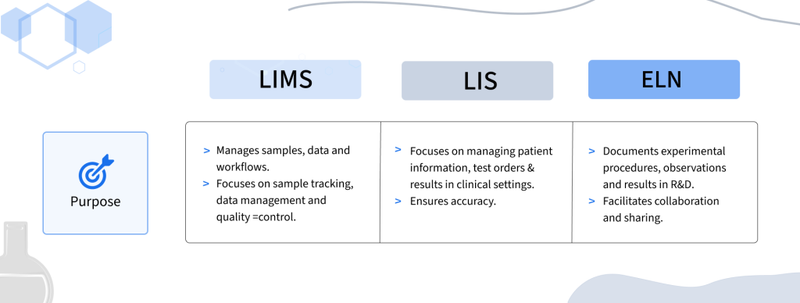
Purpose
LIMS (Laboratory Information Management System): Focuses on managing laboratory samples, data, workflows, and quality processes.
LIS (Laboratory Information System): Designed primarily for clinical and healthcare laboratories, managing patient information, test orders, specimens, and diagnostic results.
ELN (Electronic Lab Notebook): Designed for research and development, providing a digital space to document experimental procedures, observations, and results.
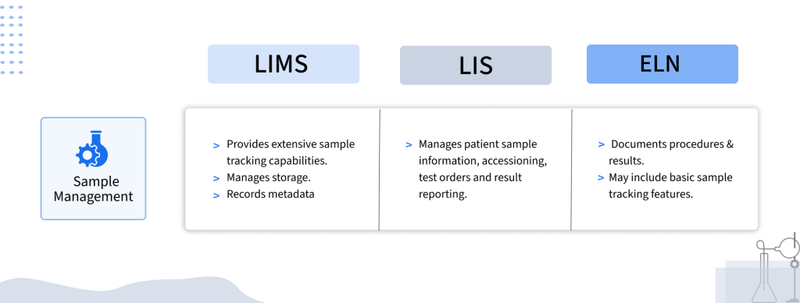
Sample Management
LIMS: Provides comprehensive sample tracking, storage management, metadata management, and lifecycle tracking.
LIS: Manages clinical specimens, including accessioning, test orders, and result reporting.
ELN: May support basic sample tracking, but its primary focus is experimental documentation rather than physical sample management.
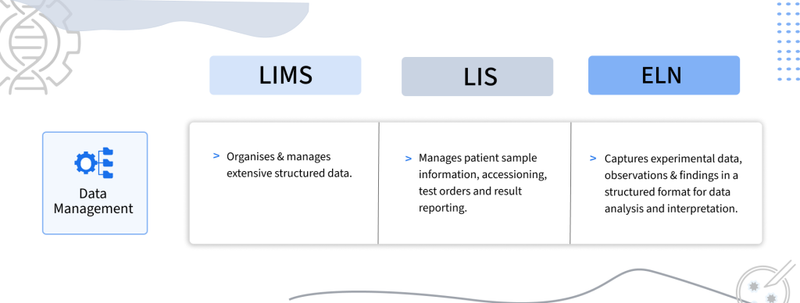
Data Management
LIMS: Organizes structured laboratory data, including sample information, test results, and instrument-generated data.
LIS: Manages patient information, diagnostic data, and clinical test results while maintaining data accuracy and traceability.
ELN: Captures experimental data, observations, protocols, and research findings in a structured digital format.
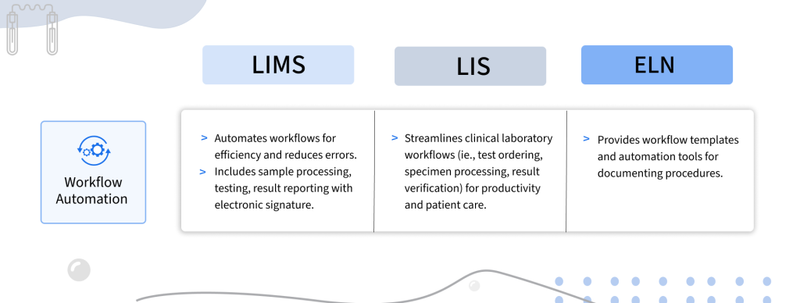
Workflow Automation
LIMS: Automates laboratory processes such as sample registration, testing, result review, and reporting.
LIS: Automates clinical workflows, including test ordering, specimen processing, result verification, and reporting.
ELN: Supports research workflows through templates, standardized protocols, and guided experimental procedures.
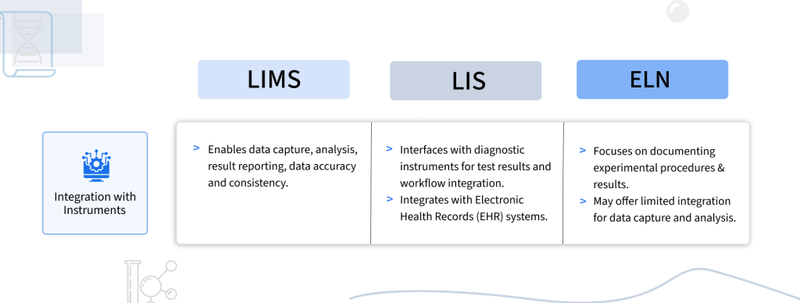
Instrument Integration
LIMS: Integrates with laboratory instruments to automate data capture, result transfer, and reporting.
LIS: Connects with diagnostic instruments and analyzers to receive and process clinical test results.
ELN: Can integrate with laboratory instruments for experimental data capture, although capabilities vary by platform.
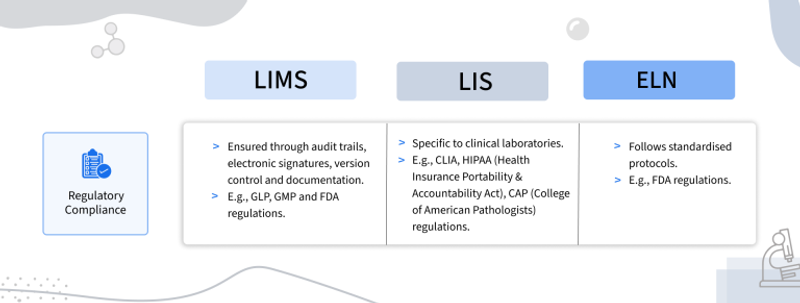
Regulatory Compliance
LIMS: Supports requirements such as GLP, GMP, and FDA regulations through features such as audit trails, electronic signatures, access controls, and data integrity controls.
LIS: Supports clinical laboratory requirements such as CLIA, HIPAA, and CAP standards, depending on the implementation and jurisdiction.
ELN: Supports research data integrity and documentation requirements through features such as audit trails, version control, access controls, and electronic signatures.
Who Benefits from LIMS?
A Laboratory Information Management System (LIMS) supports different teams across laboratory, research, healthcare, manufacturing, and regulated environments. Its benefits vary depending on each stakeholder’s responsibilities and workflows.
Laboratory Managers and Technicians
Laboratory managers and technicians use LIMS to manage day-to-day laboratory operations, including sample tracking, testing, workflows, and results. By reducing manual processes and centralizing information, LIMS can improve efficiency, accuracy, and traceability.
Researchers and Scientists
Researchers can use LIMS for data management, sample tracking, experimental data, and collaboration. When integrated with an electronic lab notebook ELN, LIMS can connect sample and laboratory workflows with research documentation.
Quality and Compliance Teams
Quality assurance and compliance teams benefit from LIMS through controlled workflows, audit trails, electronic signatures, and data integrity features. These capabilities help laboratories maintain traceability and support regulatory requirements, including 21 CFR Part 11 guidelines for pharmaceuticals where applicable.
Healthcare Providers and Clinicians
Clinical laboratories use clinical laboratory information management system solutions to manage patient samples, test orders, results, and diagnostic workflows. LIMS and LIS capabilities can help streamline laboratory processes and support timely clinical decision-making.
Manufacturing and Production Teams
Manufacturing teams use LIMS to manage raw material testing, in-process testing, finished-product analysis, and batch-related data. This helps maintain product quality, improve traceability, and support consistent production processes, particularly in industries where LIMS in pharmaceutical industry workflows are critical.
Environmental Testing Laboratories
Environmental laboratories can use LIMS to manage samples and testing data for water, air, soil, and other environmental analyses. Centralized laboratory information software helps teams track samples, manage results, and generate reports efficiently.
Forensic Laboratories
Forensic laboratories rely on LIMS to manage evidence, case information, test results, and chain-of-custody records. Centralized tracking helps maintain data integrity, confidentiality, and traceability throughout forensic investigations.
Academic and Research Institutions
Universities and research institutions can use LIMS to manage samples, research data, laboratory resources, and collaborative projects. For research-focused environments, LIMS can also complement Scientific data management system (SDMS) and ELN solutions to create a connected laboratory data environment.
How to Replace Legacy Systems with LIMS
Replacing a legacy application with a Laboratory Information Management System (LIMS) can improve scalability, data management, workflow efficiency, integration, and compliance. A structured implementation approach helps laboratories minimize disruption and achieve a smoother transition.
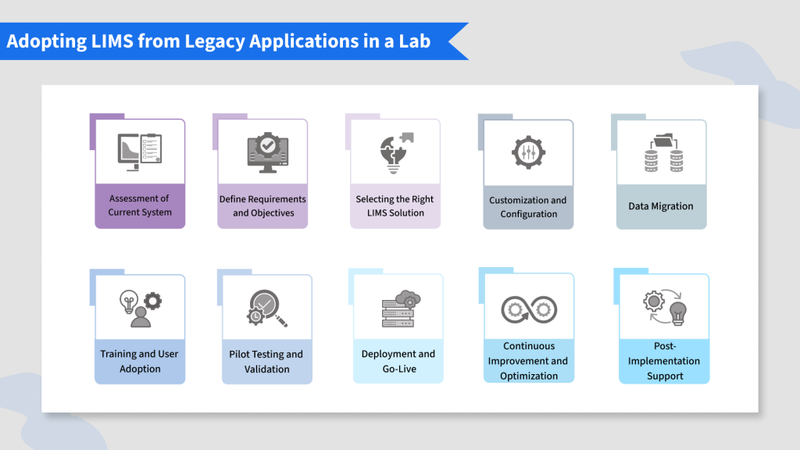
1. Assess the Current System
Evaluate your existing applications, workflows, data, integrations, and limitations. Identify the reasons for moving to LIMS, such as outdated technology, scalability challenges, inefficient processes, or changing compliance requirements.
2. Define Requirements and Objectives
Document your laboratory's requirements, including sample types, workflows, data management needs, user roles, regulatory requirements, instrument integrations, and reporting needs. Set clear objectives for the new laboratory information management system.
3. Select the Right LIMS
Evaluate LIMS platforms based on functionality, scalability, flexibility, usability, integration capabilities, vendor support, security, and cost. Choose a solution that can meet both current and future laboratory requirements.
4. Configure the System
Configure the LIMS to match your laboratory's workflows and requirements. Set up data fields, sample types, user roles, permissions, workflows, templates, and system integrations while keeping customization manageable.
5. Migrate Existing Data
Create a data migration plan covering data mapping, cleansing, transfer, and validation. Identify which legacy records need to be migrated and verify the accuracy, completeness, and integrity of transferred data before going live.
6. Train Users
Provide role-based training for laboratory staff, administrators, and other users. Introduce key workflows, system features, and best practices, while collecting feedback to address usability concerns and encourage adoption.
7. Pilot and Validate
Run the LIMS with a selected group or laboratory workflow before full deployment. Test functionality, integrations, performance, security, and data integrity. For regulated laboratories, validate the system against applicable regulatory and quality requirements.
8. Deploy and Go Live
Move the configured LIMS into the production environment and coordinate the transition between the legacy application, IT teams, vendors, and laboratory users. Closely monitor system performance and user feedback during the initial rollout.
9. Monitor and Optimize
Track laboratory metrics and user feedback after implementation to evaluate system performance and identify opportunities for improvement. Regularly update workflows and configurations as laboratory requirements evolve.
10. Provide Ongoing Support
Establish a support process for technical issues, user questions, system updates, and enhancements. Keep system documentation, SOPs, and training materials updated to support long-term LIMS adoption.
Conclusion
A Laboratory Information Management System (LIMS) helps laboratories move beyond paper-based processes by centralizing sample management, automating workflows, improving data integrity, and supporting regulatory compliance. As laboratories continue to digitize their operations, a configurable and user-friendly solution such as Qualis LIMS can help improve efficiency, reduce manual errors, strengthen traceability, and support better data-driven decisions.
See the platform behind the 30% turnaround improvement for yourself. Book a free personalized LIMS demo and bring your own sample workflow today!
- What is a Laboratory Information Management System (LIMS)
- Key Features of Qualis LIMS
- LIMS vs LIS vs ELN: Key Differences
- Who Benefits from LIMS?
- How to Replace Legacy Systems with LIMS
- Conclusion
Related articles

Data Traceability in Laboratories: Why It Matters
What Is Laboratory Traceability Laboratory traceability is the ability to trace the complete history of a s...

Clinical Research Data Management Best Practices
Managing Clinical Data Clinical research produces an immense and steadily growing volume of data across eve...

Managing Clinical Trial Samples with LIMS
Introduction: From Patient to Proof Clinical trial sample management is far more complex than routine labor...
 Contact Us